

Introduction to Model Properties
Model Properties Service
The model properties service allows callers to build and query indexes built from the BIM properties in models uploaded to Forma Data Management and BIM 360 Docs. These are the properties that can be displayed in the Viewer. Model indexes are built using the PDB (Property Database) files extracted as part of the SVF translation process. SVF2 viewable IDs are then added to these indexes from the SVF2 files generated from SVF. For a property field to be available for indexing, it must be supported in the SVF2 translation process. For backwards compatibility with existing Viewer applications, the index rows generated by the service contain both the SVF object IDs (lmvId) along with the newer SVF2 object IDs (svf2Id).
In addition to property data, the indexes built by the service contain the identities and bounding box coordinates for objects that are viewable via the Viewer, allowing callers to view the results of index queries. The API also allows users to trigger the service to calculate changes (diffs) that have occurred between consecutive versions of a model. To calculate a diff, callers specify a previous and current file version, and the service compares these versions, computing changes to their property values and bounding-box geometry.
Diff index file type support
Unlike basic property indexing, which only depends on SVF translation, diff indexing depends on element ID stability. In order for the model properties service to compare instances of the same design object in two consecutive versions of a file, the IDs of these elements must be the same. If the ID of a specific design element changes between consecutive versions of the file, the ID is said to be unstable and can’t be used in diff comparisons by the model properties service.
The file types supported by the index service for diff comparisons currently include 3D RVT and DWG files, NWC files exported from Revit and AutoCAD verticals, IFC files exported from AutoCAD architecture, MEP, Civil 3D 2018 and onwards, ARCHICAD, Revit, MagiCAD for Revit, and Tekla Structures.
Forma Data Management Permissions
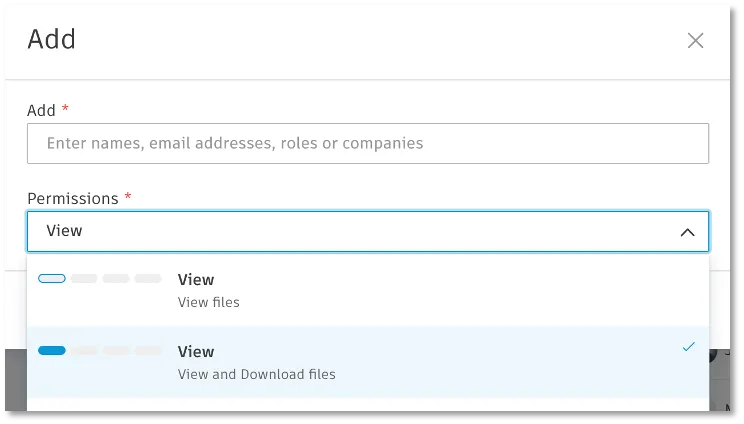
To build and query indexes with this service, the caller MUST have at least View+Download permission to the folder in Forma Data Management where the file is stored. View+Download is a minimum requirement. Users with Create or Full Control will automatically have the necessary permissions to build and query indexes, as Forma Data Management folder permissions are cumulative.
Please note that Forma Data Management folder permission changes can take a few minutes to propagate. If you are having access problems immediately after assigning new user permissions to a folder using the Forma Data Management UI, retry your indexing/query operation again after giving the permissions a few minutes to propagate. If you are still having folder access problems, please contact support.
Model Index Workflow
To build indexes, callers specify one or more file version URNs. The service works in batch, which allows multiple files to be indexed simultaneously. Taking these input URNs, the service computes an index dynamically, waiting for SVF2 translation to complete if files have not yet been converted following upload to Forma Data Management. Once constructed, the index once is comprised of three JSON resource URLs that encode the index. Running queries against an index creates further JSON resources that contain the results of the queries. All of the JSON resource files returned by the services are compressed (*.json.gzip). The table below describes the four different types of resources returned by the service.
Batch Status vs. Query
The model properties API supports two different querying mechanisms. Each mechanism serves a different purpose, but before exploring the differences it is important to understand that the model properties service is lazy. Every file uploaded to Forma Data Management is not automatically indexed. Instead callers must request that file versions be indexed by the service. Therefore, at any given moment a file may or may not be present in the model property service’s index cache.
To create indexes, users call the index or diff batch-status endpoint, depending on the type of index required (single file or file version diff). Both endpoints take one or more files to index. The batch-status endpoint treats each file passed individually, creating an index per file. This workflow is summarized in the diagram below.
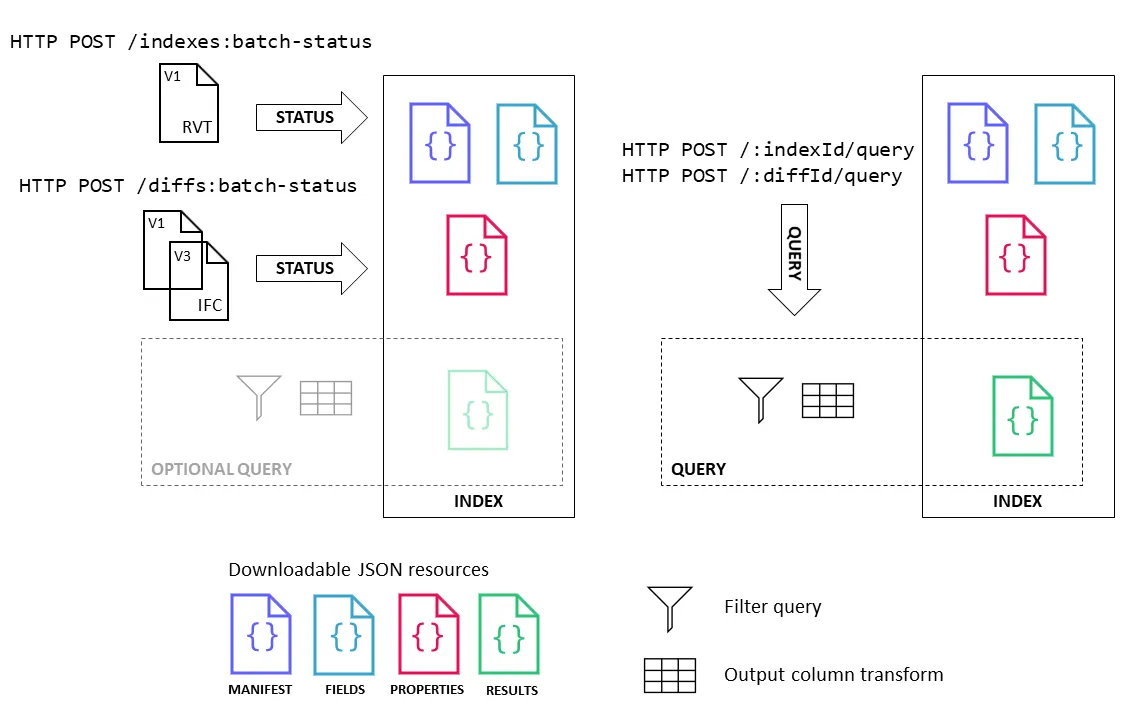
When posting to a batch-status endpoint to create an index it is also possible to simultaneously pass a query filter. If the index does not yet exist, the service will create the index and then execute the query. If the file or files have been previously indexed, the service will just execute the query. If the query has been previously executed and the results cached, the service will immediately return the resultsUrl to the to the caller. This short-cut allows callers to get results from an index that may or not exist in a single call. Once an index has been created it is also possible to query it directly by ID. The same index can be used to support an infinite array of queries. Once the client has access to an indexId (or diffId) from a call to a batch-status endpoint, these IDs can be used to directly access and query the indexes hosted by the service.
The workflow for building and querying diff indexes is almost identical to the workflow for standard indexes. The only significant differences between these two workflows is that the input file configuration necessary to specify the index. In diff indexes, you must always pass a pair of files that will be compared for changes.
For detailed instructions on how to build, query, and interpret basic and diff indexes, refer to the more detailed Querying Model Indexes and Tracking Changes in Model Versions tutorials.
Index Resources
This section details the JSON file formats of the four different resources generated by the service (manifest, fields, properties, and results).
Manifest
The following is a sample manifest generated by a request to the Model Properties service to index three Forma Data Management seed files, urn:adsk.wipprod:fs.file:vf.DyTWutcvTcOLUNUARxcTzQ?version=4, urn:adsk.wipprod:fs.file:vf.LaqNypGeQTaKs0DA__nzLA?version=4 and urn:adsk.wipprod:fs.file:vf.uyT8qe04TDSTDXC2sdfBtg?version=8.
The manifest header contains the following properties:
The seedFiles array contains objects describing the file versions used to build the index. Properties in this file which are index keys are used to connect objects rows in property or index query files to the corresponding entries in the index manifest.
The seedFiles.databases array contains the PDB database resources used to build the index. Properties that are index keys are used to connect objects rows in raw property or index query results to the corresponding entries in the index manifest.
The seedFiles.views array contains viewables which can be loaded into the Viewer to display the results of model property queries. Properties which are index keys are used to connect objects rows in raw property or index query results to the corresponding entries in the index manifest.
The manifest for a diff index is almost identical to a basic index manifest. However it has a second seedfiles root node named prev that contains the seedFiles for the previous file version(s) passed as part of the diff index specification.
Fields Resource
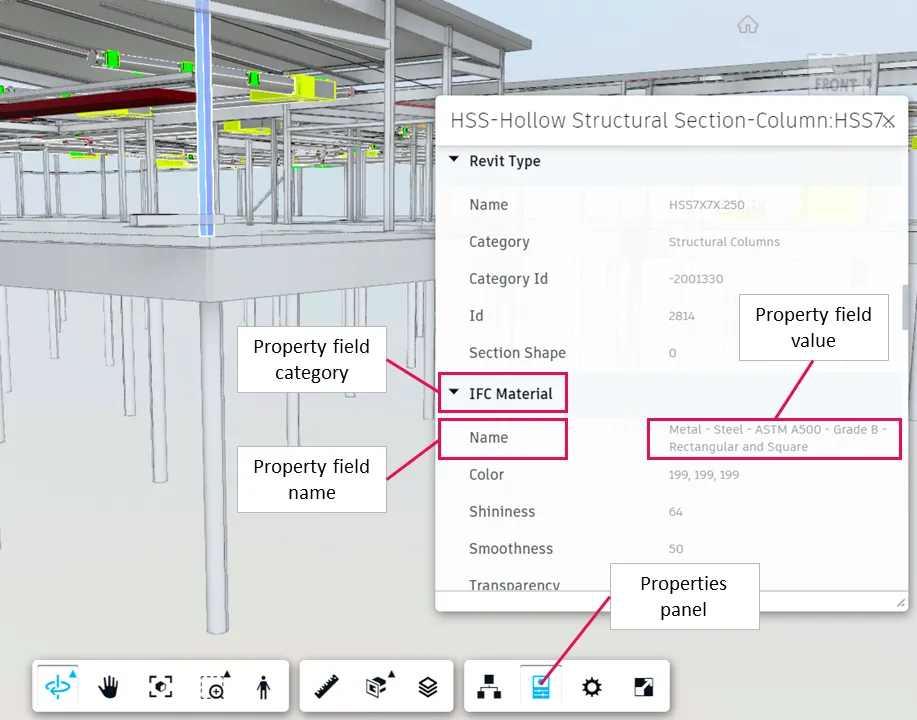
The available Viewer properties in an index are described using the fields resource. The fields resource file contains NDJSON (new-line delimited JSON) with a field per line. Each line represents a unique field (dimension) in the index. The key property of a field is required to identify the column(s) required when formulating a query to run against an index.
More formally, each field is described as follows:
Using the example fields resource above, if you want to retrieve the value for a property with a category of __name__, a data type of String with a name equal to name, you need to use the key p153cb174. To retrieve the value for a property with a category of Structural, a data type of Double, a name equal to Structural Framing Length Roundoff, and a unit of measure set to ft, you use the key pf62e5a3c.
Basic Properties Resource
The properties resource contains the full index for the file version. The example row from a basic (non-diff) index is described in the table below.
Each JSON object row, like the example above, has the following standard properties:
Diff Properties Resource
Diff index properties resources have an extended schema that builds on the schema for a basic index. The example row from a diff index is described in the table below.
Results Resources
Query results are line-delimited JSON files containing the rows matching the query filter. They are filtered subset of the raw properties resources created by indexing an individual file or creating a diff index between two versions of the same file. If no columns transformation has been applied as part of the query, the rows take the form of the properties resources described above. If a column transform is applied, the format of these rows is determined by the caller. See the accompanying query language reference for more details.
Imported from the Autodesk Platform Services documentation: https://aps.autodesk.com/en/docs/acc/v1/overview/field-guide/model-properties.