

Forma Sheets API Field Guide
This field guide describes the components of the Forma Sheets service and shows how they work together. It also provides key concepts to help you successfully use the Forma Sheets API.
For more information about Sheets features, please refer to Sheets Help.
Sheets
Sheet is the primary component of Forma Sheets service. One sheet represents one view of a document, e.g. one page of PDF, or one 2D view of RVT. Currently, the Sheets API only supports uploading PDF files and does not support associating them with collections.
This table shows the standard attributes that define each sheet:
| | Title | Yes | The title of the sheet. Shows as secondary description of Number column in Forma Sheets UI.
The title is automatically extracted from the sheet title block and can be updated on demand.
| | Tags | Yes | A list of user defined tags of the sheet. | | Version Set ID | Yes | The ID of the version set that the sheet belongs to. | | Viewable | No | The URN and view GUID that can be used to load the view in Viewer. |
Version Sets
Version set is the collection of sheets. One version set can have multiple sheets, but the sheet number must be unique in each version set. Deleting version set will also delete all the sheets within the version set.
This table shows the standard attributes that define each version set:
Uploads
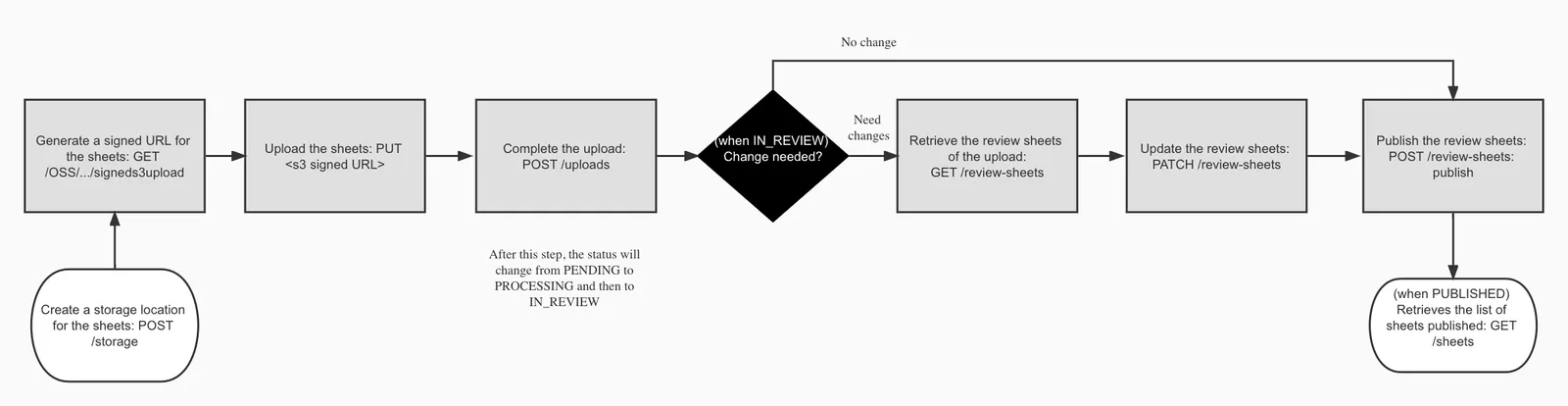
An upload represents the process of uploading files, extracting and reviewing individual sheets from the files, and publishing them to Forma Sheets.
This table shows the standard attributes that define each upload:
A typical workflow of upload will be:
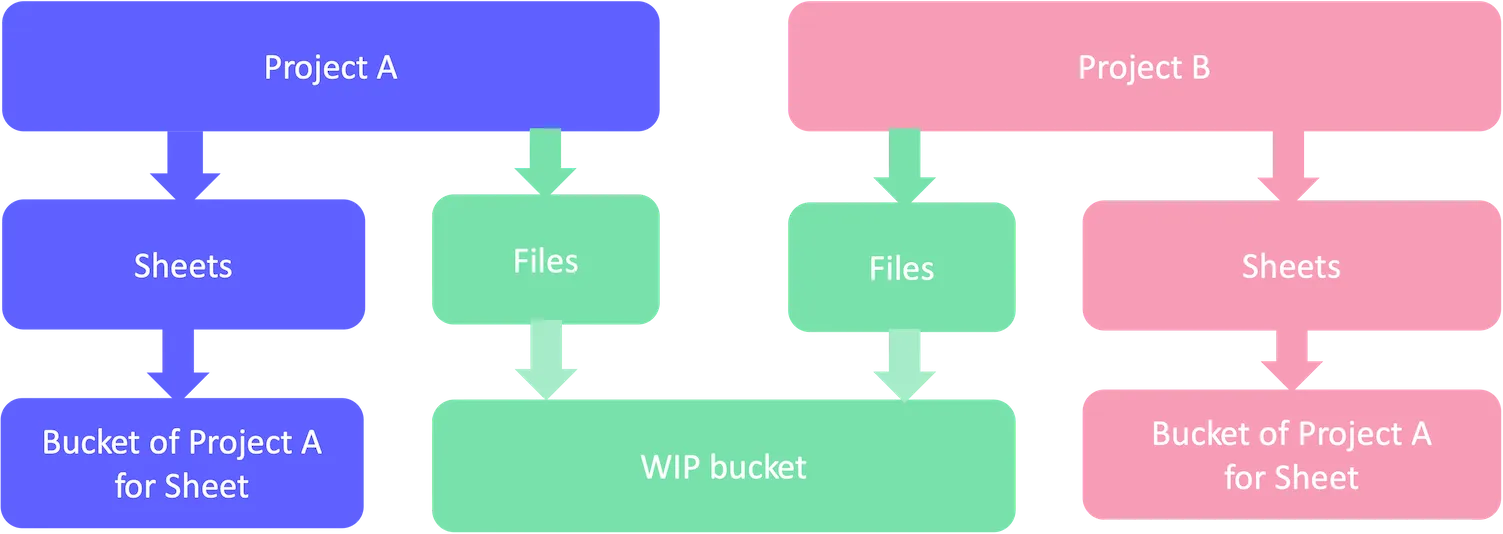
In Forma Files, all storages share one OSS bucket. But in Forma Sheets, each project has its own OSS bucket. It is recommended to extract bucket key from storage URN every time before you call OSS APIs.
Please refer to Upload Files to Forma Sheets tutorial to see a detailed example of upload.
Review Sheets
Review sheets are the objects temporarily created by upload for review before publishing. The information of review sheets is extracted from the uploaded files, and can be updated by PATCH review-sheets. Each review sheet will be converted to one sheet in upload publishing process. The new sheet will have the attributes identical to the review sheet. The review sheet will then be deleted and become no longer accessible.
The review sheets will be entirely deleted when related upload has already been published.
This table shows the standard attributes that define each review sheet:
Current Sheets
As mentioned in Version Sets section, Sheet number should be unique in one version set, but you can use same sheet number in different version sets. To avoid confusion, the Forma Sheets service orders the sheets with same number by the issuance dates of their version sets, and only shows the sheet in the last. In this case, the last sheet is the current sheet.
Sheet model has an attribute isCurrent to indicate whether a sheet is current.
You can use query parameter currentOnly to specify whether you need all the sheets or only the current sheets in the API GET sheets.
Deleting
In the Forma Sheets API, deleting behaviors are different for different kinds of components.
- Sheets: supports deleting and restoring, should use specific APIs.
- Version Sets: supports only deleting.
- Review Sheets:
deletedis just a flag that indicates upload does not need to publish this review sheet. Call PATCH review-sheets to update the attributedeleted.
Other components do not support deleting in this release.
Export
To export sheets, users must have, at a minimum, export permissions.
Users can export sheets that include both standard markups and feature markups. Currently, the features supported are Issues, Photos, and Assets. For more information on sheet markups, see the Sheets Markups Help.
Below is a table showing the different types of markups that can be included during sheet export.
Collections
A collection organizes sheets in the Forma Sheets module, enabling duplicate sheet numbers (e.g., A101, A102) across different collections within a project.
A collection can include multiple sheets and version sets, but sheet numbers must be unique within each collection.
Deleting a collection also deletes all its sheets and version sets.
Currently, the Sheets API only supports querying collections.
For more details about Sheets Collections, see the Help documentation.
This table outlines the standard attributes that define each sheets collection:
Limitations
The Forma Sheets API currently does not support the following features:
- Importing PDFs or RVTs directly from the Files module of a Forma project. You can only upload PDFs from local storage, and collections are not supported for these uploads.
- Rotating review sheets.
- Managing sheet permissions or disciplines.
- Managing markups.
- Managing collections. The Sheets API only supports querying collections.
- Managing version sets and sheets within collections.
Imported from the Autodesk Platform Services documentation: https://aps.autodesk.com/en/docs/acc/v1/overview/field-guide/sheets.