

Manage API Access to Forma Services
This walkthrough explains how to enable API access for an application in Forma. Provisioning API access allows your app to interact with Forma services.
Before You Begin
Verify that you have Admin access to a Forma hub. - Register an app, and note the client ID.
Step 1: Access Hub Administration
Log in to your Forma hub, and go to Hub Admin.
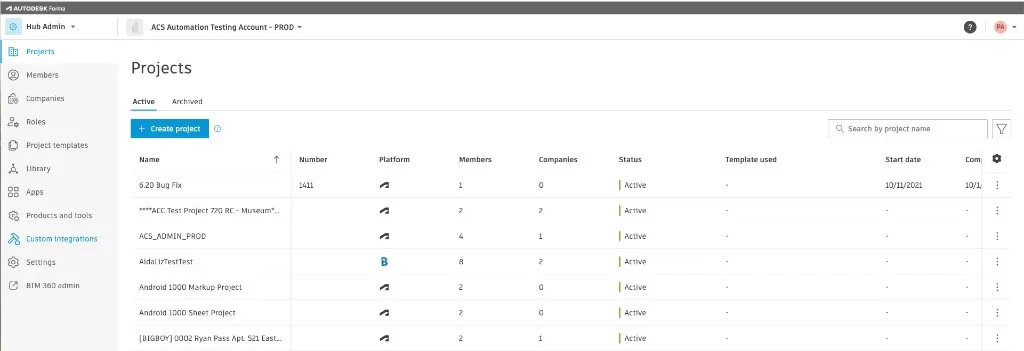
The Projects screen appears.
Step 2: Open Custom Integrations
From the left navigation, select Custom Integrations.
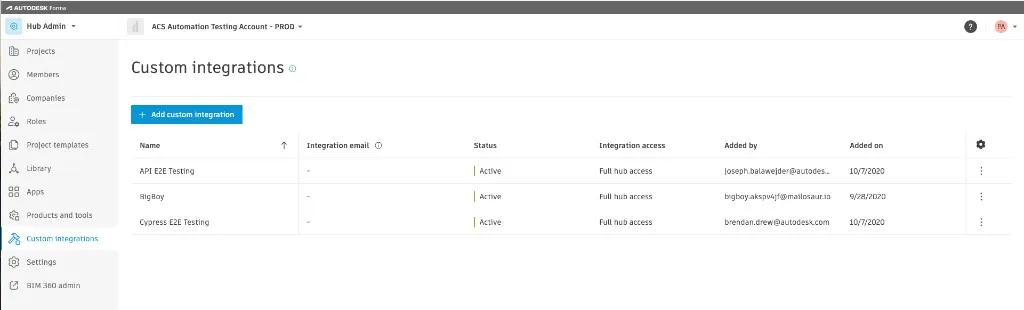
Select the Add custom integration button.
Step 3: Enter App Details
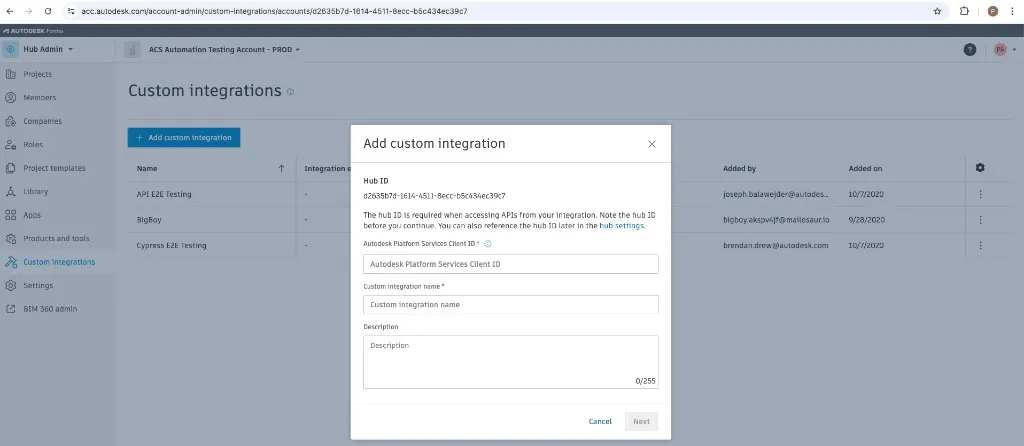
Enter the following information:
- APS Client ID (from APS registration).
- Custom Integration Name.
- (Optional) Description for clarity.
Note that the APS Client ID must match the client ID generated when you created the app. The Custom Integration Name does not need to match the original app name.
Step 4: Save and Confirm
Click “Add” to finalize the integration.
The name of the app will appear in the Custom integrations screen.
Imported from the Autodesk Platform Services documentation: https://aps.autodesk.com/en/docs/acc/v1/tutorials/getting-started/manage-access-to-acc.